
Frequently asked questions (FAQ's) about the Octalarm-IP
Is your question not listed?
Please do not hesitate to contact our helpdesk. They can be reached on Monday to Friday from 8:30 am to 5:00 pm on telephone number +31 174 794024 or by Email at helpdesk@adesys.nl.
As a guideline, you can assume that the reliability of alarm diallers can decrease significantly once they are more than 10 years old. Depending on the conditions of use and developments in telecom networks (such as the phasing out of 2G and 3G networks), this may also be the case sooner. The Octalarm-IP is no longer available. The successors to this alarm are the Octalarm-Touch and the Octalarm-Touch Pro (and possibly the ARA-Pro Next).
Additional information
- Read our knowledge articles on this subject:
- Check whether your alarm dialler still qualifies for repair and service.
- More information about the successors of the Octalarm-IP:
The Octalarm-IP is not suitable for making calls directly via a digital telephone line. A VoIP modem is required for this. If you connect the Octalarm-IP to a VoIP modem, it is important to take a number of measures.
The successor to the Octalarm-IP (the Touch or Touch-Pro) can be connected directly to VoIP. For a stable VoIP connection, we recommend a diallr from the newer Octalarm line.
Unfortunately, the DSL splitter (AU-024) is no longer available.
Would you like to check your current connection with a DSL splitter?
- For maximum security, we recommend placing the Security DSL splitter (AU-024) as close as possible to the incoming telephone line.
- Connect the earth wire as short as possible to a good ground connection.
- In the settings menu of the Octalam-IP, assign one of the available contact outputs to the Security DSL splitter. After saving this setting the Octalarm-IP is ready for use with the Security DSL splitter.
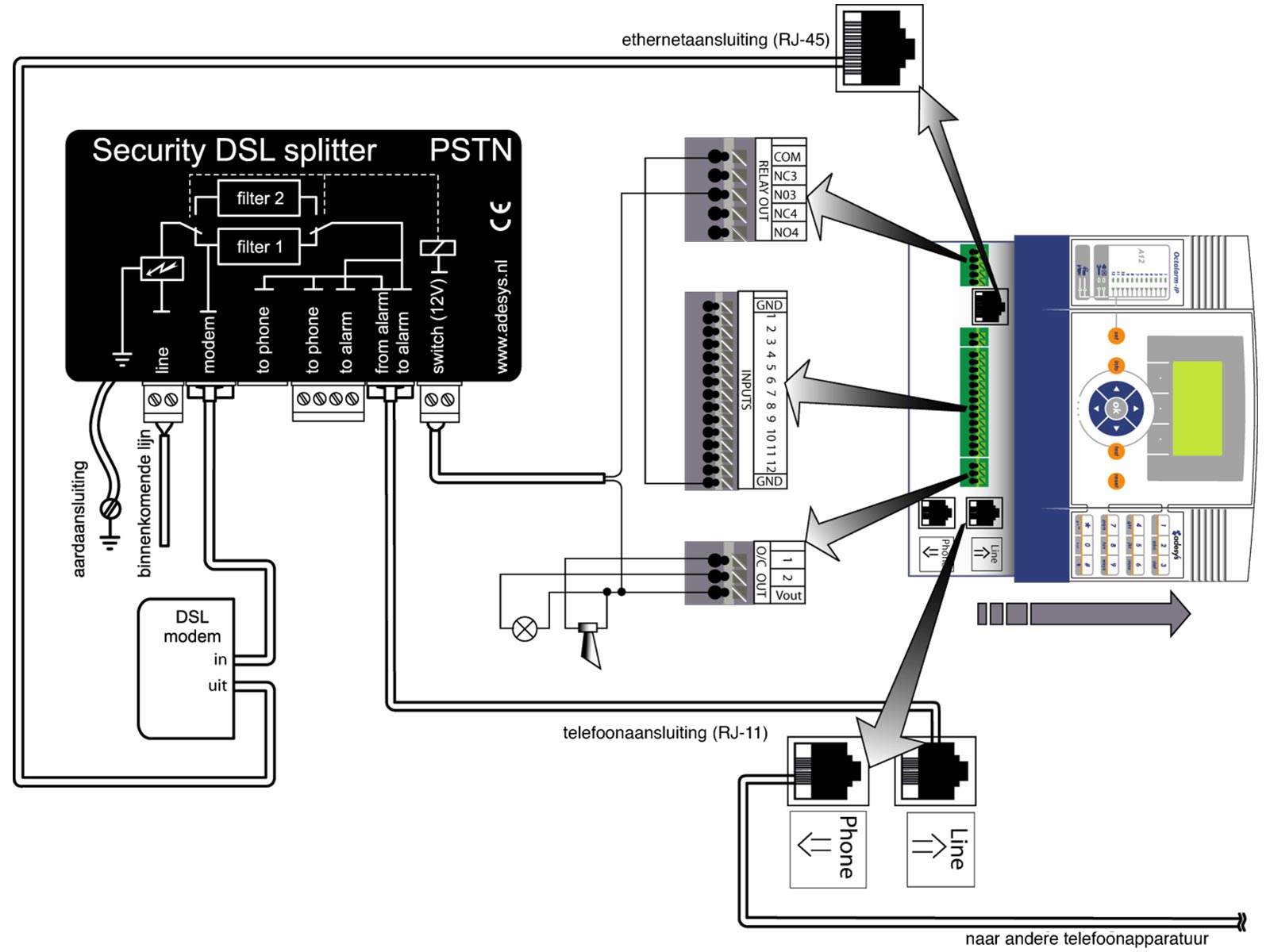
Testing
Given the great importance of good alarms, it is recommended to test the operation of the DSL splitter tests on a regular basis:
- Disconnect the cable to the switch connection on the side of the dialler.
- Check that the DSL modem is working correctly.
- Check that the alarm is correctly passed on by triggering an alarm or a test message.
- Connect the cable to the switch connection to a continuous 12V (+12V and gnd).
- Check whether the DSL modem indicates that the connection is broken.
- Check again if the alarm is correctly passed on by generating an alarm or a test message.
- Connect the cable to the switch connection to the right correct output of the dialler.
Unfortunately, the GSM module for the Octalarm-IP is no longer available. This means that you can NO LONGER expand your PE dialler with a GSM module. We therefore recommend switching to the successor to the Octalarm-IP: the Octalarm-Touch or Octalarm-Touch Pro.
- Voice telephone call.
- Text message (only available on models with GSM module).
In the event of a critical alarm, we recommend using a voice telephone call.
This is possible and can be set as follows:
- Log on to the dialler as installer.
- Select:
- 'Installer menu complete'.
- 'Action lists'.
- Go to the appropriate action list.
- Select under 'Time window' the option 'Block the notification'.
- Fill in the start and stop time of the block.
- Save the changes.
This is possible and can be set as follows:
- Log on to the dialler as installer.
- select:
- 'Installer menu complete'.
- 'Action lists'.
- Go to the appropriate action list.
- Select 'Use alternative call list' under 'Time window'.
- Save the changes.
An (operator) code gives you access to the alarm detector settings. Among other things, you can use it to change login codes. If all operators have been removed from the system, or if no one remembers the codes, you will in principle no longer be able to log in and therefore no longer be able to configure the device.
In that case, the Adésys helpdesk can generate a temporary code for you that gives you installer rights. You can then use this to create new operators. The helpdesk is available Monday to Friday from 8:30 a.m. to 5:00 p.m. on +31 174 794024 or by E-mail at helpdesk@adesys.nl.
When the red LED next to the key symbol is lit, this means that a system malfunction has occurred. The cause of the malfunction is shown on the alarm detector display. If this message is no longer visible, you can find the cause in the logbook. So it is not always a faulty emergency battery that causes the message!
Current Octalarm-IP software version: 2.11.9
There are two ways to install the latest software on an Octalarm-IP:
- Update it yourself with a PC/laptop and IP-prog
Always use the latest version of IP-prog for this. The programme can be downloaded free of charge. - Have the update carried out by the Adésys service department
You can send the dialler to Adésys for service. Please create an RMA notification in advance.
The Octalarm-IP with GSM module (type GE or PG) is supplied without a SIM card.
 The use of prepaid SIM cards in GSM alarm diallers is strongly discouraged.
The equipment cannot check or automatically top up the SIM card's credit. When the credit runs out, the alarm stops, which can lead to damage. In addition, a prepaid SIM card generally offers less functionality and reliability than a SIM card with a subscription.
Yes, this can be done in the following ways:
- With the free IP-prog setup programme (download IP-prog).
- Via a local company network with a web browser by accessing the device via the IP address of the alarm dialler. You can find the IP address by pressing 'Info' on the device itself.
Remote configuration via the ACC is nog longer possible
This application is outdated, making it increasingly difficult for us to keep the alarm centre operational. Therefore, the ACC will be deactivated in July 2021. Read the news item about the ACC being switched off.